Monday, 16 November 2015

Google Using Points To Boost User Reviews, Beef Up Maps Content

Seeking to expand Local Guides program, Google "gamifies" contribution.


A couple of years ago, Google created a program in the mold of the Yelp Elite Squad called City Experts. It was intended to accelerate the acquisition of “high-quality” local business reviews. The name of the program was changed in January of this year to Local Guides.
The original program offered rewards based on the number of reviews submitted. After 50 reviews, for example, members got to be part of a Google+ community and be invited to exclusive local events and more. Reviews were required to meet quality guidelines.
With the shift away from Google+ and the renaming of the program, Google has alsorevamped its incentives. In addition, the company is trying to broaden participation and the types of content collected.
Here are the levels and new point system:
Local guides point totals
As indicated, the reward system is now based on points that can be earned in various ways, not just by contributing reviews. In a blog post, Google says, “You can earn points and level up by writing reviews, uploading photos, adding new places, fixing outdated information, and answering simple questions. Each contribution type is worth one point, so you can earn up to five points per place.”
In other words, the company has broadened the function of Local Guides to not only provide reviews, photos and tips but also to help flag and fix incomplete or inaccurate information.
Reference URL : http://tinyurl.com/ohtprjc

Android 6 “Marshmallow” & SEO Series: Click To Search With Google Mobile

In the third and final article on the mobile search impact of Android Marshmallow's new features and capabilities, contributor Cindy Krum discusses the "Click to Search" feature.


As Google’s crawling technology becomes more sophisticated and prolific with the release of Android Marshmallow, search behavior is expanding with new input methods that are more contextual and immediate than voice or text-based search.
This article is the third in a series about Android Marshmallow-related changes to the mobile search results that will impact mobile SEO strategies. The first article in this series focused on the Private Index, and the second article focused on Google Now Cards with Merchant data.
This third and final article focuses on another subtle change that Google has added to the mix: Single-gesture search behavior. This is the ability to long-tap on a word or phrase from any page in Google Chrome to execute a new search. This single-gesture search functionality is currently only possible on Android devices so far, but it does fit well with the goals of Google’s new Android OS.
Since Google hasn’t officially announced or documented this change to the Android Chrome functionality, we are calling it “Click to Search.” Click to Search is only available on Android Chrome, unless you have Android Marshmallow, in which case you can also use a version of Click to Search from some stock OS apps like Mail (though not YouTube, Google+, Messenger, News, PlayStore or Calendar yet).
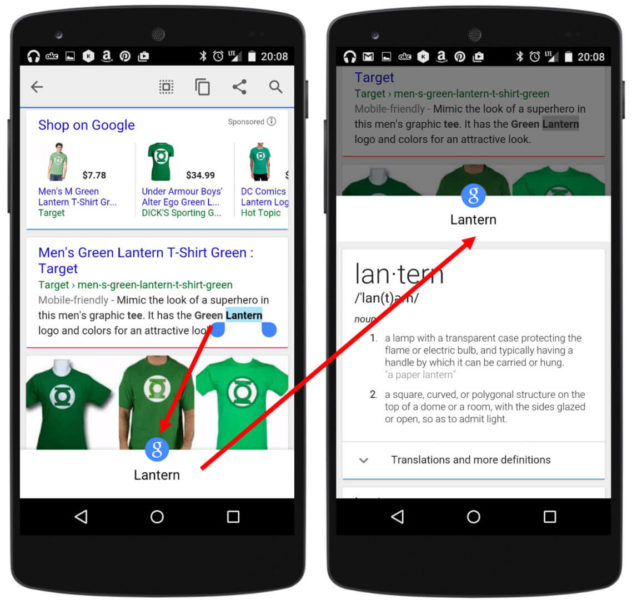
Click to Search Green Lantern
With “Click to Search,” Google’s goal seems to be to enable “drill-down” style search activity without requiring searchers to go back to the search result page, or even find the address bar, to submit their new query.
This may seem like a minor improvement in user experience, but remember, it saves searchers from having to endure extra page loads on mobile devices, and more importantly, it eliminates the need for typing to submit a search. Both are very important aspects of the mobile search user experience.

How Does Click To Search Work?

The ability to initiate a search from a tap on a word is enabled by screen crawling, described in the first article in this series. From Google’s perspective, once the screen is crawled, why not make everything on it a potential search query? This is how Google is tapping into contextual relevance for chained queries and Now on Tap searches — based primarily on what is on your screen when you initiate a search.
This is great for mobile devices, but also for anything with a limited keyboard, or no keyboard at all, such as mobile watches and other wearables. On devices like this, searchers may submit their first query through Google Now with a typed or voice command, then use “Click to Search” as they navigate the web on their Android Wear watch interface to find more detailed information about their original query.
This new method of initiating a search may also encourage people to search more from Android Wear devices and make them more willing to leave the site or app screen that they are on, by searching again to find details on a topic that is within other app or web content, rather than simply investigating within one website.
Barring telepathy, it actually seems like the most intuitive search experience on a smartwatch possible. For those of us who already have Android Marshmallow and Now on Tap, this single-gesture search behavior will seem remarkably similar to the long-hold on the Home button which initiates a Now on Tap search.
This alternative singe-gesture feature initiates an immediate screen crawl and works from any screen on your phone. It can surface more information about whatever text it reads on the screen — not just a single word. It can pull results from the public and Private Index, but it also will show website and app icons at the bottom of the result, as you can see to the right, in the Facebook screen-crawling example.

Why Is Click To Search Important For SEO?

From an SEO perspective, the search results for the word you are highlighting do appear to be the same as the search results you would get if you started at Google.com and typed in the query there — the results do not seem to be chained or contextual yet. The difference between a regular Google search result and a “Click to Search” result is currently all in the display.
Only the first item in the “Click to Search” result is shown in a preview box, without an additional click. Often the first result will be some kind of curated Google result, such as a Featured Rich Snippet (Answer Box), Knowledge Graph result, Location Card, definition or something similar, so ranking a website in this “Click to Search” experience will be hard.
Click to Search DC Comics Example
Curated Google results are not 100 percent guaranteed, though — Sometimes the first result is a Wikipedia entry or an actual website. Images, YouTube videos and basically anything that can show up in a regular mobile search (including sponsored listings and PPC results) can become the top “Click to Search” result.
For SEOs, it will be important to watch how these types of search options change mobile user behavior, since the potential for an “exit” can now lead directly to websites, apps or search results from this new interface.
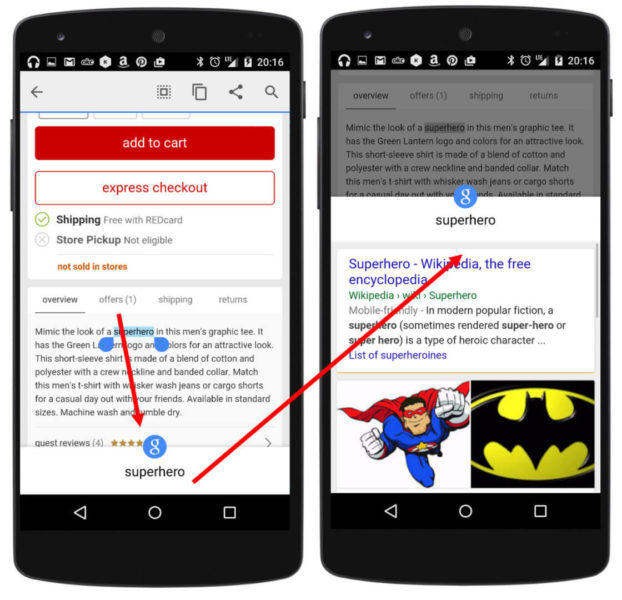
The “superhero” example Click to Search query below shows a search that is initiated from a Target.com shopping page. That search could just as easily have been on a very strategic e-commerce keyword like “men’s graphic tee” or “men’s t-shirt,” in which a competitive website or Google Shopping result ranked first.
Click to Search Superhero
This new type of query input brings up a lot of questions for SEOs. Will these new interactivity options decrease page views and time on site, or will users ignore this new search option until they are forced to embrace it on smaller devices like smartwatches? Similarly, will users embrace the long-hold on the home button to access Now on Tap, or will it be ignored?
Both certainly put more importance on ranking #1 for a query, but Google may just fill the results with Featured Rich Snippets, Google Play recommendations and PPC ads, so then what will we do? We are looking forward to the evolution of Android Marshmallow/Google Now on Tap so that we can really see how this new search option plays out.
The next thing to consider is when Google will begin allowing this type of search behavior on images — and leveraging the image relationships and machine learning discussed in the second article in this series. Perhaps soon, users will be able to click on an image in your site or your app to find similar products in other apps or websites.
These image query results might also be prioritized based on Private Index information, because the user has viewed it before, or they could be ranking because many users have it stored in their Private Index. “Click to Search” on images would add a much deeper layer of complexity to a variety of different types of searches and could really change some aspects of mobile SEO dramatically.
It might also represent a significant privacy concern for users. (Would strangers be able to submit a picture of me that they have taken on the street and learn more about me from image-recognition search? Hopefully not!) For e-commerce, however, product matching by image recognition does seem like a logical next step.
Another unknown is how we will report on this new type of search behavior. We have no idea how marketers will be able to report on or attribute searches like this. Google’s analytics and reporting platforms will also need to adapt to all of the changes that came about. The potential traffic loss seems like it could be significant, especially for sites that provide an undesirable mobile user experience or are missing pertinent information.
It would be great if Google Analytics could report on the “exit keywords” that people click on while they are on your site, but don’t hold your breath. The Click to Search action represents an on-site user behavior, rather than that being part of Google’s private referrer data, so it should be included, but as useful as it could be, keyword-level reporting seems particularly unlikely.

Final Thoughts

Mobile search seems to have been a catalyst for change at Google, and they are trying hard to create browsers and operating systems that minimize the need for manual input of search queries in a variety of different ways.
The image recognition, machine learning, Click to Search and Private Index capabilities that are being added to Google Now, Now on Tap, Android Marshmallow and Chrome blur the lines between app and web, but they also blur the lines between private and public, sponsored and organic and content and query.
All of this surely seems to make for a better, more intuitive experience for the user but a more complicated and entangled effort from marketers and SEOs. We are all eager to see what Google will add to the mix next but hope that more documentation, tracking and focus on cross-account UX will be forthcoming, as we are all just as eager as Google is to embrace our mobile audience.
Reference URL : http://tinyurl.com/p97dpmk

Google’s Natural Language Search Gets Smarter

Google is now smarter at understanding queries that include superlatives and times, as well as more complicated questions.


google-logo-red10-1920
Google is saying their search engine is getting better at understanding our natural language searches by specifically better handling superlatives, times and more complicated questions.
Satyajeet Salgar, Google Product Manager, said Google is better at understanding your queries in three ways.

Superlatives

Google now understands superlatives, such as “tallest,” “largest” and so on, as well as ordered items. So you can ask the Google app the following questions:
  • Who are the tallest Mavericks players?
  • What are the largest cities in Texas?
  • What are the largest cities in Iowa by area?

Time-Based Queries:

Google is better at understanding the time you mention in your query, for example:
  • What was the population of Singapore in 1965?
  • What songs did Taylor Swift record in 2014?
  • What was the Royals roster in 2013?

More Complicated Queries:

Google is also better at understanding more complex combinations. So Google can now respond to questions like:
  • What are some of Seth Gabel’s father-in-law’s movies?
  • What was the US population when Bernie Sanders was born?
  • Who was the US President when the Angels won the World Series?
Here is a graphic Google shared explaining some of the progression.
How the Google app understands complex questions
Reference URL : http://tinyurl.com/nc4mgmm

Facebook Now Using Google App Indexing To Drive Visitors From Search Into Its App

Use of app indexing will send searchers from Google into the Facebook app, but only on Android and not for all Facebook content.


google-facebook-new6-1920
Facebook has long opened up some of its walled garden to Google, in order to gain Google traffic. Now Facebook is stepping up its search engine optimization game by implementing Google App Indexing to ensure it continues to get that traffic as the shift to mobile continues.

Facebook Loves Google Traffic

Facebook has allowed Google to index some of its content going back to at least 2007, when Facebook profile pages were opened up to Google and other search engines. “Indexing” means that Google can read all the content on these pages. In turn, when people search, these pages might appear in Google’s search results.
This indexing — known so well to search engine optimization (SEO) professionals — has benefits to both Google and Facebook. Google has more content that might satisfy what people are searching for. Facebook gets traffic from Google for free.
Over time, Facebook has opened up more of the content is has to Google, such as Facebook Comments in 2011. The news today about Google App Indexing support doesn’t add more content but is aimed to ensure that those finding existing content from Facebook within Google have a better mobile experience.

App Indexing Means Loading Facebook, Not The Browser

The Wall Street Journal broke the news on this today, saying that Facebook began allowing Google App Indexing as of Friday, according to Google. Facebook also confirmed the same directly to Search Engine Land.
With Google App Indexing, Google is able to jump people from a web page listing directly into a publisher’s app, where the same content loads.
In the case of Facebook, this means that when someone clicks on a Facebook listing in Google search, rather than load a web page with that content, in some cases Google instead understands how to open up the Facebook app and load the same content within that.
This only happens for that content that Facebook has already opened up to Google, such as public profiles, Facebook pages, groups and events (assuming they haven’t themselves been blocked by Facebook account holders, such as if they are private in nature).
One notable class of pages that haven’t gotten Google App Indexing are personal posts or status updates that are open to the public. Google is able to index these now. They’ll also show up when people do mobile searches on Google. But Facebook hasn’t implemented the Google App Indexing code for them, that I can see, which means they’ll still load in the browser rather than the Facebook app.

App Indexing Doesn’t Gather New Information

Facebook is not providing any new information through app indexing that Google doesn’t already get, Facebook confirmed to me directly. So when the WSJ wrote this, it wasn’t quite right:
Google’s search engine is dominant on the Web, but its computers can’t automatically “crawl” and categorize the information inside apps, where smartphone users spend the majority of their time. So it must persuade app developers to let it peer inside.
In many cases, it’s not that apps contain information that Google can’t index — and most cases, if you’re talking apps from those with major web sites. Apps often pull information from the same source to power both their web sites and apps. Yelp, TripAdvisor and Facebook are examples of publishers like this, where Google knows very well what’s inside their apps because what’s inside their apps is also what’s inside their websites.
Rather, Google App Indexing today is much more about making a better experience for the searcher, jumping them directly into an app instead of a browser, rather than somehow magically finding information that’s only in the app.

Only For Android, Not Apple Or Bing

I can see Google App Indexing code live now, such as on our own Search Engine Land page at Facebook. However, my test searches when using an Android Nexus 6P are not jumping me from Google’s search results into the Facebook app that I have installed, as they should.
I’m checking with Google on this, but chances are Google simply hasn’t updated many of the new Facebook pages to see the new code. When those pages are reindexed over the coming days, this should work.
This only will work for Android. Facebook has not implemented similar mechanisms fromApple or Bing, so mobile searches on iOS (either in Safari or Chrome) or for those using Windows Mobile will not launch the Facebook app. Facebook said it had no comment on why these were omitted.

Why Do It?

Why was it Google confirmed the news of this to the WSJ, rather than Facebook. It’s not like there was any special agreement that needed to be put in place. As it turns out, Google told us it was part of a general discussion about how companies are making use of app indexing.
It is a big win, so to speak, for Google App Indexing. Facebook’s move may encourage more publishers to make use of it, which can mean a better experience for Google’s mobile users.
But it’s also right in line with SEO best practices. That is, this is exactly what you’d expect any organization to do if they care about SEO. Google has been rewarding apps over the browser within its search result to a degree that, at times, it’s arguably worse for users. But for publishers, it makes plenty of sense to ride the app indexing train, especially for potential ranking boosts.
As for Facebook, it told us that it implemented Google App Indexing as part of a desire to improve the experience for those who use its app.
Reference URLhttp://tinyurl.com/o2esgod

Wednesday, 4 November 2015

Conquering Pagination – A Guide to Consolidating your Content

A topic sure to make any SEO neophyte’s head spin, approaching and handling pagination can seem a daunting prospect at first. Pagination is a wily shapeshifter, rearing its ugly head in contexts ranging from e-commerce, to newspapers, to forums. Bottom line is, if you’re in the business of on-page optimization, it’s not a question of if you’ll have to deal with pagination problems – it’s a question of when. Luckily, we’re here to give you some advice to get you started, and answer some of the more thought-provoking questions that can arise in tricky situations.
Pagination Example
So what exactly is pagination, you ask? In a very basic sense, pagination occurs when a website segments content over the span of multiple pages. On an e-commerce site, this will take the form of product and category listings. On a news site, articles may be divided up across multiple pages or arranged in the form of a slideshow. On forums, groups and topic threads will typically span at least 2-3 pages. Even blogs, which tend to feature article previews ordered from latest to oldest, will run into pagination issues on their homepage.
“Big deal”, you may say. “I see this happening all over the place, so what is the problem with paginated content?” From an SEO perspective, pagination can cause serious issues with Google’s ability to index your site’s content. Let’s explore a few of the potential issues that arise when you paginate your content without taking the proper precautions:
  • Crawler Limitations
    When Googlebot is crawling your site, the depth (or levels of clicks deeper into the content) it travels will vary depending on the site’s authority and other factors. If you have a tremendous amount of paginated content, the odds that Googlebot will travel through all paginated content to reach and index the final pages decreases significantly.
  • Duplicate Problems
    Depending on the context of the pagination, it is very likely that some elements across the series of pages may contain similar or identical content. In addition to this, you’ll often find that identical title tags and meta descriptions tend to propagate across a span of paginated content. Duplicate content can cause massive confusion for Googlebot when it comes time to determine which pages to return for search queries.
  • Thin Content
    In situations (such as the aforementioned news sites) where articles or product reviews tend to be segmented into multiple pages, you run the risk of not providing enough original content for the individual pages to be indexed separately. More importantly, this also creates the risk of running too low on content-to-advertisement ratios, which can set your site up for devastating Panda penalties further down the road.

So how do you deal with Pagination?

Your best option is always optimal site design. There are a number of ways that these problems can be prevented before they begin. When planning the design of an ecommerce or similar site, consider the following measures you can take to cut down on large-scale pagination issues:
  1. Increasing the number of categories, which will decrease the depth of each paginated series
  2. Increasing the number of products per page, which will decrease the number of total pages in the paginated series
  3. Linking to all pages within the now manageable paginated series from the first page, which will alleviate any crawl-depth and link authority flow problems
However, in many real world scenarios, the damage has already been done and a site structure overhaul is not an option. Luckily, Google has given us a variety of methods to better steer the crawlers through our deep crypts of paginated content. As an SEO, you have three weapons in your arsenal to preemptively deal with any problems that may arise out of pagination:

Option 1: Remove your paginated content from the index

There are many situations where simply taking the paginated content off the table is the best solution. If there are no particular advantages to having this content indexed and searchable, then the easiest solution is to implement a <META NAME="ROBOTS" CONTENT="NOINDEX, FOLLOW"> tag within the <head> section of every page in the paginated series, excluding the first page. You’ll want to make sure to include the “FOLLOW” tag here if this is a listing series of any kind – this will ensure that page authority will travel into the individual destination pages throughout the list, despite the list itself being precluded from Google’s index. Including the “FOLLOW” tag may also help some link authority that is arriving at pages within the paginated series to travel back to the indexed first page and the rest of the site.
noindex
AdvantagesDisadvantages
The least complex of all solutions.While it does solve potential pagination problems, it also eliminates the paginated content from Google’s index.
Great for situations in which there is no logical reason to index the paginated content.

Option 2: View-All Page and rel=“canonical”

Google’s preferred first choice for handling most pagination issues is to create a separate “View-All” page apart from the paginated series and include all of the items within this single page. Once you’ve created the View-All page, you can then place a rel="canonical" tag within the <head> section of each paginated component page, pointing to the View-All Page. (e.g. <link rel="canonical" href="http://www.site.com/view-all-page"/>). This will essentially tell Google to treat each specific page in a paginated series as a segment of the View-All page and queries will return the View-All page as opposed to a relevant segment page of the pagination chain.
view-all
Google states that this is their preferred method of guiding Googlebot through paginated content, and that users typically prefer a view-all page. Whether users actually prefer a view-all page is debatable and certainly depends on the context of each situation. There is one large caveat to this method – the View-All page has to be manageable enough to load within a “reasonable amount of time”, which is generally regarded as 2-4 seconds. This makes it a great option for consolidating text-only product and category listings that exist within 5-20 pages of paginated content. Conversely, it makes this a poor choice for consolidating paginated articles with many images and product or category listings with hundreds of pages.
AdvantagesDisadvantages
Relatively simple implementationNot a solution for massive or image heavy series of paginated content
Google’s first choice solutionSome businesses may be unwilling or unable to implement a View-All page for product listings
All content within the pagination sequence will be represented on the search engine via the View-All page
Can present a more user-friendly navigation method.

Option 3: Rel=“prev”/“next”

Our final option for dealing with pagination problems may be the most complicated, but it is arguably the most versatile. Google now recognizes the rel=“prev” and “next” HTML attributes as a method of indicating a sequence of paginated pages. The implementation can be tricky, and you have to be exceptionally careful when applying this method. Let’s take a look at how this works.
You have four pages of paginated content:
next-prev
By using rel="prev"/"next", you’re essentially creating a chain between all sites in the pagination series. You’ll begin the chain with Page 1, adding the following code to the <head> section of the page’s HTML:
(Page 1):
<link rel="next" href="http://www.site.com/page2.html">
That’s the only step we have to take for the beginning of the chain. Now we move on to Page 2. Consider that Page 2 is now in the middle of the chain, so we have to attach it both to the page before it, and to the next page in the sequence. Page 2 would have the following code in the <head>:
(Page 2):
<link rel="prev" href="http://www.site.com/page1.html">
<link rel="next" href="http://www.site.com/page3.html">
Now just as you might have assumed, since Page 3 is also in the center of this sequence of linked pages, we have to continue to implement the code in a similar manner:
(Page 3):
<link rel="prev" href="http://www.site.com/page2.html">
<link rel="next" href="http://www.site.com/page4.html">
And so we’ve reached Page 4, the last in our chain of paginated content. The last page should only contain a rel="prev" attribute in the <head>, as there are no further pages within the sequence:
(Page 4):
<link rel="prev" href=" http://www.site.com/page3.html">
Using this complete sequence of rel="prev"/"next", Google is able to consolidate this group of paginated content into a single entry in their index. This essentially tells Google to treat the sequence of paginated content as one entry within their index. Typically, the first page will be returned to the user as it is usually the most relevant to a query regarding the paginated series. However, Google has noted there as scenarios where a more relevant page within the sequence is returned if the query is particularly centered around the content on that page.
AdvantagesDisadvantages
Unparalleled flexibilityImplementation can be complicated
Allows resolving pagination issues without use of a View-All pageRequires proper execution of the chain in order to be effective
Can be executed properly with only minor changes to HTML
An important thing to note with rel=”prev”/”next” implementations is that they can be used alongside canonical tags. While this will become particularly useful in the advanced concepts section, it is worth noting that if you’re in the practice of using self-referential canonical tags, they will function the same way within a rel=”prev”/”next” chain.

Advanced Pagination Concepts

Now that we’ve tackled the basics, its time to take a look at some of the more interesting questions and scenarios you’ll run into once you start getting comfortable with pagination.

Setting a Benchmark

If you have access to your server logs, it’s fairly simple to determine the success with which Googlebot is currently crawling your unadjusted paginated content. Before any changes are implemented, we recommend choosing a few paginated series within your site and determining how many pages deep into the series Googlebot is crawling. Once you’ve determined this you can then perform search queries to investigate how many of these pages Google is choosing to include in the index.
This will give you a starting point benchmark that will enable you to determine the success of your efforts. After you have implemented your changes, you can revisit the server logs upon Googlebot’s return to determine whether crawl-depth and indexation rates have improved.

AJAX and Javascript scroll setups

You’ve likely ran into infinite scroll setups on ecommerce sites in which the content will continuously load as you scroll towards the bottom of the screen. While this is a nice feature to improve the user experience, AJAX and Javascript reliant navigation functions should always be implemented using Progressive Enhancement.
Ensuring that the site will function properly for users that have Javascript disabled is not only considerate to your users, but it also allows you to implement the pagination solutions discussed in this guide beneath the enhanced user experience features. This will enable Googlebot to properly crawl and index your content while you provide advanced Javascript navigation features for your visitors.

Relevancy Signals: View-All Pages vs. rel=“prev”/“next”

You may find yourself in the fortunate position to be able to choose whether to implement a View-All page orrel="prev"/"next". Although we do have indicators from Google suggesting that View-All is the preferred method for handling these pagination issues, there are certain contexts in which a rel="prev"/"next"implementation could prove more beneficial, as far as relevancy signals are concerned.
Consider for a moment that Google has stated that both View-All Page canonicalization andrel="prev"/"next" sequences consolidate all incoming link authority into the pages that ultimately will rank for queries related to them. The View-All page will naturally consolidate this link authority via the canonical tags pointed towards it and the ranking page in the sequence of rel="prev"/"next" will inherit the link authority via the properties Google uses to link the component pages together in the index.
Now that we’ve established link authority will be similar in both methods, we’re left with one very interesting question: What about the other relevancy signals that affect the page’s ability to rank? What happens to the unique URLs, the title tags, the meta descriptions, the H1/H2s and other factors? We know that the canonicalization that occurs when using the View-All method will effectively register these factors moot – Google knows to look to the canonical page for these items.
But if a series of pages linked together via rel="prev"/"next" contain unique title tags and URLs, and any one of these pages has the opportunity to rank for a query based on them, then they could potentially retain these relevancy signals as opposed to having them washed away via canonicalization.
Clearly, this is not a consideration for a simple paginated product or category listing with similar content across the series of pages. There is no unique relevancy factor to be found with “page1.htm” vs. “page2.htm”, and no ranking advantages to “Dresses Page 1” as opposed to “Dresses Page 2”. But what about a situation like the one below?
sport-football-tenis-hockey
The truth is, no one really knows exactly how Google treats the rel="prev"/"next" sequence within the index. However if we do know that in at least some cases, pages further into the sequence than the first page will be returned in the SERPS, it’s safe to assume that the URL, title tag, and other factors will still play some role in determining relevancy to any given query.

Parameters and rel=“prev”/“next”

In some cases when dealing with rel="prev"/"next", your paginated URLS will contain parameters that do not change the content of the page, such as unique session ID’s. An experienced SEO will tell you these are bad news – if you don’t give Google specific instructions on how to deal with these situations you may wind up with duplicate content problems.
You always have the option of just telling Googlebot to not crawl certain URLS using “URL Parameters” in Webmaster Tools, but what if you’d like to preserve link authority that is coming in to these parameterizedURLS? We can make that happen, using rel="prev"/"next" in conjunction with canonical tags.
First, you have to make sure that all pages within a paginated rel="prev"/"next" sequence are using the same parameter. Second, each parameterized URL can also canonicalize to the non-parameterized version of the URL. For example, we’ve got the same 4 pages of paginated content, but this time the user is being tracked via session ID 55:
complex

Filtered Content and rel=“prev”/“next”

Now let’s say you’re working with parameters that filter the content within a paginated series. For example, say we’ve got a parameter on a paginated set of product listing URLS that filter via brand, such as:
Page 1: http://www.site.com/page1.html?brand=nike
In this situation, the content on each page will depend on this variable. For example:
Page 1: http://www.site.com/page1.html?brand=adidas
Page 2: http://www.site.com/page2.html?brand=adidas
Will be returning a completely different set of products than:
Page 1: http://www.site.com/page1.html?brand=reebok
Page 2: http://www.site.com/page2.html?brand=reebok
If you believe there is value in having each filtered product type in Google’s index, your best plan of action is to create separate paginated sequences for each brand filter. You won’t be using canonical tags in this situation, since the content will be unique depending on the parameter. Here’s an example of how to handle this scenario:
complex-and1

Sorted Content and rel=“prev”/“next”

The last type of parameterized URL type we’re going to look at is sorted content. You’re more likely to find this type of parameter in a forum or blog type setting, though it will exist frequently on ecommerce sites as well. For example:
When you first arrive at the page, the URL might read:
Page 1: http://www.news-site.com/page1.html?order=oldest
But there may be an option to view the newest items first, resulting in this URL:
Page 1: http://www.news-site.com/page1.html?order=newest
There’s currently a fair amount of debate in the SEO community as to how to treat this type of situation. Though some would suggest attempting a separate rel=”prev”/”next” sequence for both “newest” and “oldest” sort method URLS, in our opinion this would essentially be indicating to Google that you would like them to index multiple paginated sequences of identical content. The only difference between these two paginated groups would be that the content is displayed in a different order, still putting you in dangerous territory for duplicate content.
Ayima recommends taking the safe route on this, and presenting only one sorted paginated sequence to Google for indexing. The default sort method should carry a rel="prev"/"next" pagination method:
blocked
The alternate sorting method, in this case newest, should be blocked from indexation. This is most quickly accomplished using URL Parameters in Webmaster Tools, specifying the parameter and allowing Googlebot to crawl only the default value.
screen
These solutions may seem complicated at first, but they are easily manageable if you address each instance of pagination separately and apply the proper rule for each scenario. It may be helpful to consult this flow chart provided in order to simplify the decision making process:
complex-and
We’ve seen many situations in which rel="prev"/"next" are implemented incorrectly, so be sure to double-check your chains upon completion. Dealing with these problems can be painful, but with careful planning and thorough implementation you’ll be successfully guiding Google through your site before pagination has a chance to ruin your day.